Loading...

Helping you navigate Google’s transition to Client Hints

Published: January 31, 2023 by Experian Marketing Services

In 2022, Google began changing the availability of the information available in User-Agent strings across their Chromium browsers. The change is to use the set of HTTP request header fields called Client Hints. Through this process, a server can request, and if approved by the client, receive information that would have been previously freely available in the User-Agent string. This change is likely to have an impact on publishers across the open web that may use User-Agent information today.

To explain what this change means, how it will impact the AdTech industry, and what you can do to prepare, we spoke with Nate West, our Director of Product.

What is the difference between User-Agents and Client Hints?

A User-Agent (UA) is a string, or line of text, that identifies information about a web server’s browser and operating system. For example, it can indicate if a device is on Safari on a Mac or Chrome on Windows.

Here is an example UA string from a Mac laptop running Chrome:

User-Agent string example

To limit the passive fingerprinting of users, Google is reducing components of the UA strings in their Chromium browsers and introducing Client Hints. When there is a trusted relationship between first-party domain owners and third-party servers, Client Hints can be used to share the same data.

This transition began in early 2022 with bigger expected changes beginning in February 2023. You can see in the above example, Chrome/109.0.0.0, where browser version information is already no longer available from the UA string on this desktop Chrome browser.

How can you use User-Agent device attributes today?

UA string information can be used for a variety of reasons. It is a component in web servers that has been available for decades. In the AdTech space, it can be used in various ad targeting use cases. It can be used by publishers to better understand their audience. The shift to limit access and information shared is to prevent nefarious usage of the data.

What are the benefits of Client Hints?

By using Client Hints, a domain owner, or publisher, can manage access to data activity that occurs on their web properties. Having that control may be advantageous. The format of the information shared is also cleaner than parsing a string from User-Agents. Although, given that Client Hints are not the norm across all browsers, a long-term solution may be needed to manage UA strings and Client Hints.

An advantage of capturing and sharing Client Hint information is to be prepared and understand if there is any impact to your systems and processes. This will help with the currently planned transition by Google, but also should the full UA string become further restricted.

Who will be impacted by this change?

Publishers across the open web should lean in to understand this change and any potential impact to them. The programmatic ecosystem supporting real-time bidding (RTB) needs to continue pushing for adoption of OpenRTB 2.6, which supports the passing of client hint information in place of data from UA strings.

What is Google’s timeline for implementing Client Hints?
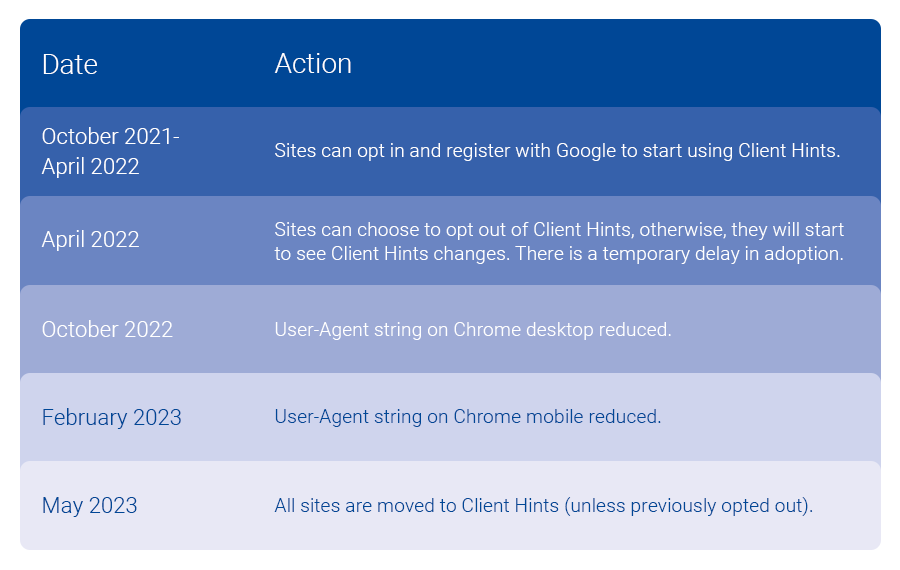
Google's timeline for implementing Client Hints in Chromium browsers
Source: Google

Do businesses have to implement Client Hints? What happens if they don’t?

Not capturing and sharing with trusted partners can impact capabilities in place today. Given Chromium browsers account for a sizable portion of web traffic, the impact will vary for each publisher and tech company in the ecosystem. I would assess how UA strings are in use today, where you may have security concerns or not, and look to get more information on how to maintain data sharing with trusted partners.

We can help you adopt Client Hints

Reach out to our Customer Success team at tapadcustomersuccess@experian.com to explore the best options to handle the User-Agent changes and implement Client Hints. As leaders in the AdTech space, we’re here to help you successfully make this transition. Together we can review the options available to put you and your team on the best path forward.

About our expert

Nate West headshot

Nate West, Director of Product

Nate West joined Experian in 2022 as the Director of Product for our identity graph. Nate focuses on making sure our partners maintain and grow identity resolution solutions today in an ever-changing future state. He has over a decade of experience working for media organizations and AdTech platforms.


Latest posts

Loading…
Understanding the search landscape

In 2013 and beyond, marketers will have to work even harder to gain and maintain position in organic search results. They’ll also need to spend more effectively on paid search ads by knowing how their target customers use search, and by applying insight into their behaviors and attitudes to plan and execute better content and campaigns. Here’s an excerpt on the search landscape from the upcoming 2013 Digital Marketer Report: Five Websites captured 20 percent of all search activity in Q4 2012, while the top 500 captured nearly 50 percent. Expansion to the top 1,000 Websites reached nearly 75 percent, highlighting the challenges for marketers to reach potential customers through search, even for those with a large Web presence. Top five Websites to capture search clicks Websites Domain Q4 2012 – share of search clicks Facebook www.facebook.com 8.48% YouTube www.youtube.com 5.55% Yahoo! www.yahoo.com 2.63% Wikipedia www.wikipedia.org 2.01% Amazon.com www.amazon.com 1.40% Source: Experian Marketing Services’ Hitwise Source: Experian Marketing Services’ Hitwise Even through paid search, the landscape changes very little — the top 10 Websites captured 16 percent of all paid search clicks, and the top 500 captured 56 percent. Top five Websites to capture paid search clicks Websites Domain Q4 2012 – share of paid search clicks Amazon www.amazon.com 4.19% eBay www.ebay.com 3.46% eHow www.ehow.com 2.44% BestBuy www.bestbuy.com 1.06% Yahoo! Shopping shopping.yahoo.com .85% Source: Experian Marketing Services’ Hitwise Source: Experian Marketing Services’ Hitwise Breaking through the clutter is key to reaching customers who are in the market for your product and services. Understanding who your ideal customers are can help to focus your search campaigns on these consumers and see greater campaign effectiveness. For more digital consumer insights, pre-order The 2013 Digital Marketer Report today.

Feb 19,2013 by

The Paleo diet is top 2013 diet search

With the New Year upon us, many Americans have turned to the Internet to help with their 2013 resolution of losing weight. According to Experian Marketing Services’ data, the most searched for diet was the “Paleo diet” for the week ending January 5, 2013. Searches for diets are one of the more predictable patterns on the Internet, with the high point always being the first of the year, and the low-point being around Thanksgiving week. Marketers can benefit from this trend by understanding and planning around the seasonality of this interest. Other top 10 searches that contained the term diet for last week included popular diets such as the Atkins diet, Gluten Free diet, and the 8-hour diet. Additional top 2013 diet searches included the Cabbage Soup diet, South Beach diet, Shred diet and the HCG diet. The Paleo diet, Gluten Free diet and Shred diet are all new to the top 10 list. Looking back at the same week in 2012 the Dash diet owned the #1 spot, and in 2011 the HCG diet was #1. The actual top overall search term this past week was Paula Deen diet, as she announced that she lost more than 30 pounds after revealing she had diabetes earlier in 2012. Interestingly enough, the term diabetic diet made the top 10 searches for the second straight year. Other trends we noticed include the continued popularity of low carb diets with the Paleo, Atkins, South Beach diets all taking top place in search term data. We’re also seeing the return of a religion based diet (the Jesus diet was popular in 2010) with the Daniel's diet among the top 20 searches in 2013. Many fad diets pop-up this time year usually with a time period attached – 2-day, 17-day or 3-day diets. So who is doing all the searching? Females accounted for 58% of diet searches this past week and households who earn between $30K-60K a year made up the majority of searches with 33%. The states with highest index of diet searches include: Delaware, North Dakota, Wyoming, Wisconsin and Nebraska. For more insights like this please follow us on twitter @ExperianMKT. Learn more about the author, Matt Tatham

Jan 08,2013 by Experian Marketing Services

Christmas Day 2012 retail visits increase 27% compared to 2011

The home stretch for the holidays is nearing as second wind for retailers is just starting as Experian Marketing Services analyzes the post-Christmas retail trend. Christmas Day 2012 saw a 27% increase in online traffic to the top 500 retail sites compared to 2011. The top retail sites received more than 115.5 million total U.S. visits. To date the holiday online traffic for the past 7 weeks to retail sites are up 10% for 2012 vs. 2011. Each retail holiday milestone day saw online traffic increases so far this season. Amazon remained the top visited site among retailers for this past week ending Dec. 22, 2012 and was also the top visited site on Christmas Day. Walmart, Target, BestBuy and Macy’s round out the top 5 most visited sites. The chart below includes the top 10 results: As tablets dominated our weekly top product search lists all holiday season it wasn’t surprising to see that the Apple iTunes site visits increased 193% and Apple.com visits increased 155% on Christmas Day 2012 vs. Christmas Eve 2012. The top product search terms sending traffic to the Apple.com site were iPod Nano, iPad Mini and iPad 4. Amazon.com visits increased 24% on Christmas Day 2012 vs. Christmas Eve 2012 as the top product search terms sending traffic to their site were Amazon Kindle, Kindle Fire and Kindle Also seeing growth were gift card searches as the year-over-year total search volume for "gift card" variations increased 6.1% this year compared to 2011. The big spike in searches happened last week (as online shoppers passed shipping deadlines). Below are the top 10 gift card searches for last week. We will continue to publish retail site data and insights through this holiday season.  Please leave us a comment below if you have any specific questions along the way. UPDATE: The top 500 retail sites received more than 129 million total US visits on Dec. 26th, an increase of 1% compared to 2011 and 12% compared to Christmas Day 2012. Amazon was the top site followed by Walmart, Target, BestBuy and Macy’s. JCPenney, QVC and The Home Depot all moved into the top 10 on the day after Christmas. Learn more about the author, Matt Tatham

Dec 27,2012 by Experian Marketing Services

Subscribe to our newsletter

Enter your name and email for the latest updates

This site is protected by reCAPTCHA and the Google Privacy Policy and Terms of Service apply.

About Experian Marketing Services

At Experian Marketing Services, we use data and insights to help brands have more meaningful interactions with people. As leaders in the evolution of the advertising landscape, Experian Marketing Services can help you identify your customers and the right potential customers, uncover the most appropriate communication channels, develop messages that resonate, and measure the effectiveness of marketing activities and campaigns.

Visit our website

Subscribe to our newsletter

Stay up to date on the latest industry news and receive expert tips from our marketing experts.
Subscribe now!